
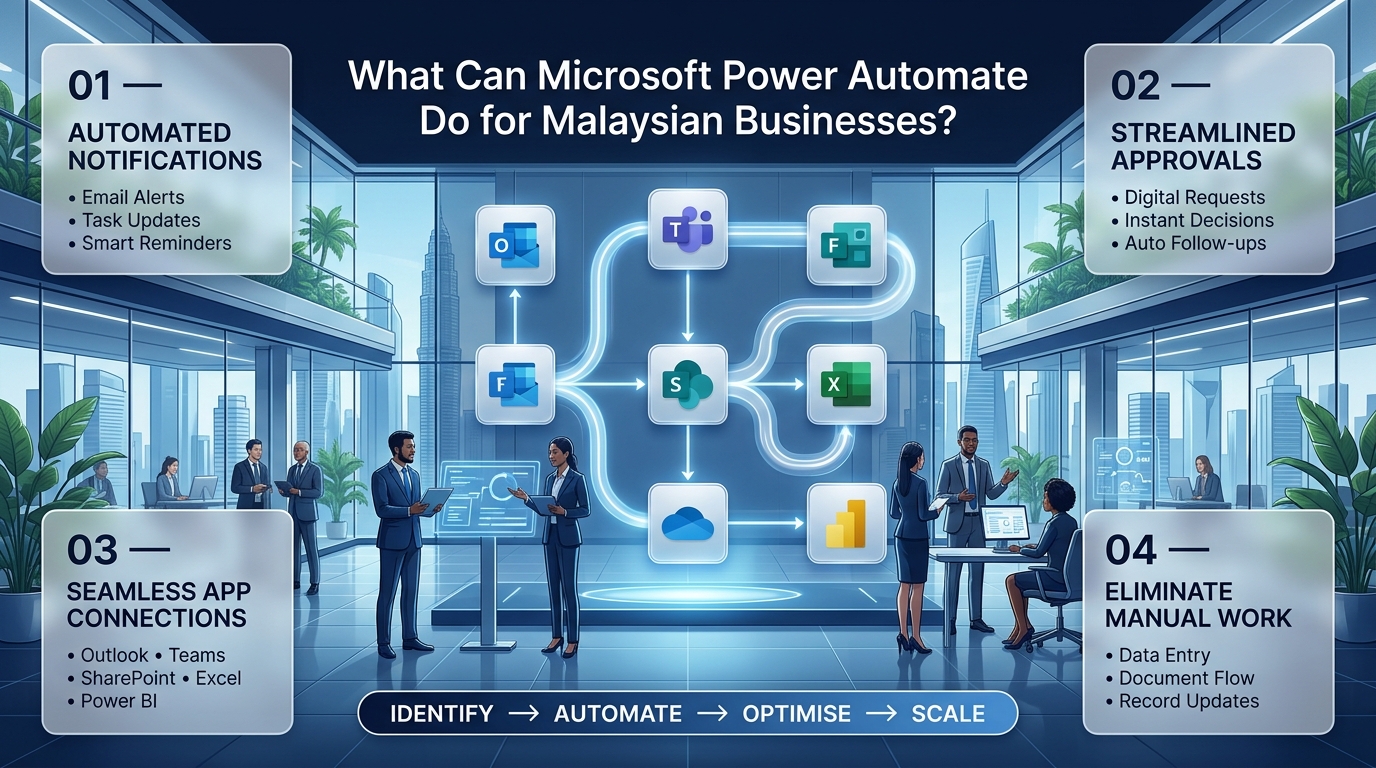
Businesses today handle a wide range of repetitive tasks every day, from sending email notifications and managing approvals to updating documents and transferring information between different applications. When these processes are handled manually, they can take up valuable time and increase the risk of errors. Over time, these small inefficiencies can accumulate and affect overall business productivity.
This is where Microsoft Power Automate can help. As part of the Microsoft ecosystem, Power Automate allows businesses to create automated workflows that connect applications, trigger actions and reduce repetitive administrative work. It provides a practical way for organisations to improve efficiency without needing to build complex custom software.
For Malaysian businesses looking to improve productivity and streamline their daily operations, understanding how Microsoft Power Automate works can be a useful step towards practical business process automation.
What Is Microsoft Power Automate?
Microsoft Power Automate is a workflow automation platform that helps users automate repetitive business processes. It is part of the broader Microsoft Power Platform, which also includes tools for data analysis and application development.
It can connect different applications and services so that an action in one system can automatically trigger another action. For example, a new form submission could trigger an email notification, create a record or start an approval process. This means that information can move between systems automatically, without requiring employees to manually update each one.
Instead of employees repeatedly performing the same manual steps, businesses can create workflows that handle these processes automatically. This allows employees to focus on more valuable tasks that require human judgment and creativity.
Why Is Workflow Automation Important for Malaysian Businesses?
Many businesses rely on repetitive administrative processes to keep their operations running. These may include processing requests, sending notifications, organising files, updating records and managing approvals. While these tasks are necessary, they can consume a significant amount of employee time.
When these tasks are performed manually, employees may spend significant amounts of time on work that could potentially be automated. This not only reduces productivity but also increases the risk of errors and inconsistencies.
Workflow automation can help businesses:
-
Reduce repetitive administrative tasks
-
Improve consistency across business processes
-
Reduce manual data entry
-
Minimise avoidable errors
-
Improve communication between departments
-
Save time on routine workflows
-
Allow employees to focus on more valuable tasks
For businesses already using Microsoft 365, Power Automate can also provide opportunities to connect existing Microsoft applications into more efficient workflows. This means that organisations can get more value from the tools they are already using.
What Can Microsoft Power Automate Do for Businesses?
1. Automate Email Notifications
Power Automate can automatically send email notifications when specific events occur. This helps ensure that the right people are informed at the right time, without requiring manual follow-ups.
For example, a business could create a workflow that sends a notification whenever:
-
A new enquiry is submitted
-
A document is uploaded
-
An approval is requested
-
A task is completed
-
A deadline is approaching
This can help employees stay informed without manually checking for updates. Automated notifications also reduce the risk of missed messages and delayed responses.
2. Simplify Approval Workflows
Many businesses require approvals for expenses, documents, leave applications, purchase requests and other internal processes. These approval processes can become slow and difficult to track when handled manually.
Power Automate can help route approval requests to the appropriate person and notify relevant employees when decisions are made. This creates a more structured process and reduces the need to manually follow up on every request. Employees can also see the status of their requests more easily, which improves transparency and accountability.
3. Connect Microsoft 365 Applications
One of the advantages of Power Automate is its ability to connect different applications and services. This allows information to flow smoothly between the tools that employees use every day.
Businesses can create workflows involving tools such as:
-
Microsoft Outlook
-
Microsoft Teams
-
Microsoft Forms
-
SharePoint
-
Excel
-
OneDrive
-
Power BI
This can help information move between different applications without requiring employees to repeatedly copy and paste data. The result is faster, more accurate, and more consistent information sharing across the organisation.
4. Reduce Repetitive Data Entry
Manual data entry can become time-consuming when employees need to transfer the same information between systems. It also increases the risk of typing errors and duplicate records.
Power Automate can automate certain data-transfer processes when suitable applications and connectors are available. For example, information submitted through a form could automatically be transferred to a spreadsheet or stored in another connected system. This reduces manual effort and improves data accuracy.
5. Organise Documents Automatically
Businesses often deal with large numbers of documents, reports and files. Managing these documents manually can be time-consuming and may lead to misplaced or disorganised files.
Power Automate can help automate document-related processes such as moving files, creating notifications or triggering workflows when documents are added or updated. This can make document management more structured and reduce unnecessary manual work. It also helps ensure that documents are stored consistently and are easier to find when needed.
How Can Different Departments Use Power Automate?
Power Automate can be applied across different areas of a business depending on its processes and requirements. Because it connects so many different applications, it can be adapted to suit a wide range of departmental needs.
Human Resources
HR teams can use automation for processes such as employee requests, onboarding notifications, document collection and approval workflows. This can help HR departments manage routine tasks more efficiently while ensuring that employees receive timely updates.
Finance
Finance departments can automate selected approval processes, notifications, document handling and repetitive administrative tasks. This can improve accuracy and reduce the time spent on manual processing, allowing finance teams to focus on more strategic work.
Sales & Marketing
Sales and marketing teams can use workflows to manage enquiries, notifications, follow-ups and information collected through online forms. This helps ensure that leads are followed up promptly and that important information is not lost.
Administration
Administrative teams can benefit from automating routine processes involving documents, approvals, notifications and internal requests. This can improve overall office efficiency and reduce the burden of repetitive tasks.
The most suitable automation depends on the existing workflow and the applications already used by the organisation. Taking the time to identify the right opportunities can help ensure that automation delivers real benefits.
Can Small Businesses in Malaysia Use Microsoft Power Automate?
Yes. Power Automate is not limited to large organisations. Small and medium-sized businesses may also benefit from automating repetitive processes, particularly when employees are spending significant time handling routine administrative work.
For a smaller business, automation could begin with a simple process such as:
-
Sending notifications
-
Managing approval requests
-
Organising documents
-
Processing form submissions
-
Updating records
-
Connecting Microsoft 365 applications
Starting with smaller workflows can allow businesses to understand the benefits of automation before expanding into more complex processes. This gradual approach helps reduce the risk of disruption while allowing employees to build confidence with the technology.
What Are the Benefits of Microsoft Power Automate?
When implemented appropriately, workflow automation can provide several practical benefits. These benefits can be seen across different departments and can contribute to overall business improvement.
Improved Productivity
Employees can spend less time completing repetitive administrative tasks and more time focusing on responsibilities that require human input. This can lead to better use of employee time and improved overall output.
Better Process Consistency
Automated workflows can follow predefined steps, helping businesses maintain more consistent processes. This reduces the risk of steps being missed or performed differently each time.
Reduced Manual Work
Routine actions can be automated instead of being performed manually every time. This reduces the workload on employees and allows them to focus on higher-value tasks.
Improved Communication
Automated notifications can help ensure that employees receive relevant information when specific events occur. This improves coordination between departments and reduces delays caused by missed communication.
Better Workflow Visibility
Structured workflows can make it easier for businesses to understand how tasks move between employees, departments and applications. This visibility can help organisations identify bottlenecks and improve their processes over time.
What Should Businesses Consider Before Automating a Process?
Automation should not simply be added to every business process. It is important to understand the current workflow before making changes to ensure that automation solves a real problem.
Before creating a workflow, businesses should first understand how the current process works.
Important considerations include:
-
What problem is the business trying to solve?
-
How often is the process performed?
-
Which steps are repetitive?
-
Which employees are involved?
-
Which applications are currently being used?
-
What information needs to move between systems?
-
What should happen if an error occurs?
Understanding these factors can help businesses create automation that solves a real operational problem rather than adding unnecessary complexity. A well-planned automation project is more likely to deliver meaningful results.
Why Is Power Automate Training Important?
Although Power Automate can simplify workflow automation, users still need to understand how workflows are structured and how different applications interact. Without proper knowledge, automation projects can become inefficient or difficult to maintain.
Training can help employees learn how to:
-
Identify suitable processes for automation
-
Understand triggers and actions
-
Connect applications and services
-
Build basic workflows
-
Test automated processes
-
Identify potential errors
-
Monitor and improve workflows
For organisations, structured Power Automate training in Malaysia can also help employees develop practical automation skills that are relevant to their daily responsibilities. This can lead to more successful automation projects and better use of the platform.
How Can Businesses Get Started With Power Automate?
Businesses can approach automation through a structured process. Following a clear approach helps ensure that automation projects are well-planned and deliver real value.
1. Identify the Process
Choose a repetitive process that takes up valuable time or requires frequent manual work. Starting with a clear and well-defined process makes it easier to measure the benefits of automation.
2. Review the Current Workflow
Understand how the task is completed and identify the people, applications and steps involved. This helps ensure that the automation is designed to match the actual process.
3. Identify Opportunities for Automation
Look for repetitive actions such as sending notifications, transferring data, requesting approvals or organising documents. These are often the best candidates for automation.
4. Build the Workflow
Create a Power Automate workflow based on the business requirements and existing process. The workflow should be designed to solve a specific problem and integrate smoothly with existing tools.
5. Test the Automation
Run the workflow and check each step under different situations to ensure that it works correctly. Testing helps identify issues before the workflow is used in a live environment.
6. Monitor and Improve
Review the workflow after implementation and make adjustments where necessary. Continuous improvement helps ensure that the automation remains effective as business needs change.
This approach allows businesses to introduce automation gradually while keeping the focus on practical business requirements.
Why Should Malaysian Businesses Explore Workflow Automation?
As businesses become increasingly dependent on digital tools, the ability to connect systems and automate repetitive processes can become an important part of workplace productivity. Organisations that embrace automation are often better positioned to respond to changing business demands.
Microsoft Power Automate provides businesses with a way to connect applications, automate workflows and reduce repetitive manual work. It offers a practical entry point into business process automation without requiring extensive technical expertise.
For Malaysian organisations already using Microsoft 365, exploring Power Automate can be a practical way to identify opportunities for workflow improvement and digital upskilling. It can also help businesses prepare for a more digital and automated future.
Conclusion
Microsoft Power Automate can help Malaysian businesses automate repetitive workflows, connect Microsoft applications and improve the way routine tasks are handled. From email notifications and approval workflows to document management and data entry, automation can support different departments across an organisation. Whether it is a small business looking to reduce administrative workload or a larger organisation seeking to improve coordination between teams, Power Automate offers a practical and accessible way to introduce automation into daily operations.
However, successful automation starts with understanding the existing process and identifying where automation can provide genuine value. By taking a structured approach and investing in proper training, businesses can develop practical automation skills and create workflows that support more efficient day-to-day operations. It is also important to remember that automation is not about replacing employees, but about freeing them from repetitive tasks so they can focus on work that requires human judgment, creativity and decision-making.
As Malaysian businesses continue to adopt digital tools, workflow automation can become an important part of improving productivity and maintaining a competitive edge. With the right training and implementation approach, organisations can build a workforce that is confident in using automation to support their business goals. Businesses that start early and build their automation capabilities gradually will be better prepared to adapt to future changes and take advantage of new opportunities in an increasingly digital workplace.
FAQs
1. What is Microsoft Power Automate?
Microsoft Power Automate is a workflow automation platform that allows businesses to create automated processes connecting different applications and services. It helps reduce repetitive manual work by triggering actions automatically based on specific events.
2. Is Microsoft Power Automate suitable for small businesses in Malaysia?
Yes, Power Automate is suitable for businesses of all sizes. Small and medium-sized businesses can benefit from automating simple processes such as notifications, approvals and document management before expanding to more complex workflows.
3. What types of tasks can Power Automate handle?
Power Automate can handle tasks such as sending email notifications, managing approval workflows, connecting Microsoft 365 applications, reducing repetitive data entry and organising documents automatically.
4. Do employees need technical skills to use Power Automate?
While Power Automate is designed to be user-friendly, some training is recommended to help employees understand how workflows are structured and how to connect different applications effectively.
5. How can Power Automate training benefit my organisation?
Power Automate training helps employees identify suitable automation opportunities, build and test workflows, and improve existing processes. This can lead to better productivity and more successful automation projects.