
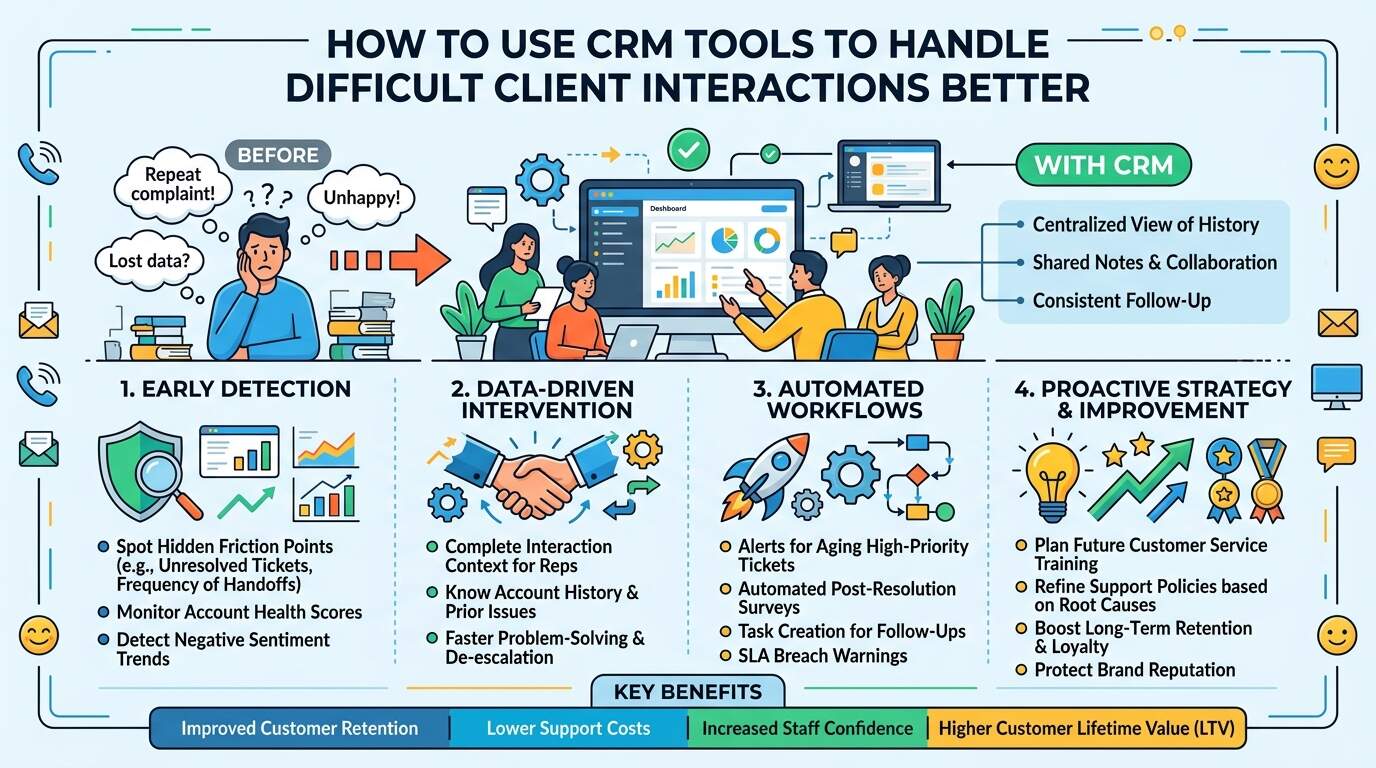
Managing client relationships is a fundamental part of running a successful business. Positive customer experiences build brand loyalty, drive repeat business, and encourage referrals. However, even the most customer-centric organizations inevitably encounter challenging situations, disgruntled accounts, or frustrated buyers. When expectations are unmet or communication breaks down, front-line teams face high-stress client interactions that can escalate quickly if handled poorly.
Many difficult client situations arise not from bad intentions, but from a lack of context, delayed responses, or inconsistent communication across different team members. Without centralized data, representatives often enter customer conversations blind, forcing frustrated clients to repeat their grievances. This is where modern Customer Relationship Management (CRM) tools play a pivotal role.
By serving as a single source of truth, CRM platforms provide the data, visibility, and automation needed to de-escalate tensions, streamline problem-solving, and convert challenging client interactions into opportunities for long-term customer retention.
What Is a CRM Tool in Client Interaction Management?
A Customer Relationship Management (CRM) tool is a centralized digital platform designed to manage, organize, and track all interactions between a business and its current or potential clients.
When managing challenging customer conversations, trained service teams rely on CRM tools to analyze key parameters, including:
- Comprehensive interaction history (emails, calls, live chats)
- Account status and purchase history
- Prior customer support tickets and resolution logs
- Customer sentiment indicators and feedback ratings
- SLA (Service Level Agreement) status and resolution timelines
- Preferred communication channels and contact details
- Assigned account managers and internal notes
- Surrounding business environment and context
The goal of utilizing a CRM in these scenarios is to provide representatives with complete context so they can handle difficult client interactions with empathy, accuracy, and efficiency.
Why Using CRM Tools for Difficult Client Interactions Is Important
Not every unhappy client is ready to leave, and not every complaint stems from a broken product. Some customer frustrations remain hidden until a minor issue triggers an emotional reaction.
Leveraging CRM tools during these critical moments helps organizations:
- Detect recurring client pain points
- Prevent miscommunication across departments
- Reduce customer churn and accident-prone escalations
- Protect account revenue and brand reputation
- Improve team collaboration during crises
- Plan future customer service training
Early intervention driven by accurate data often prevents costly customer departures.
Identifying Hidden Friction Points in Client Communications
Professional CRM usage allows teams to spot early warning signs before a client interaction reaches a breaking point.
Common hidden friction points include:
- Unresolved tickets languishing without updates
- Frequent handoffs between different departments
- Misaligned promises made during sales onboarding
- Patterns of late payments or billing disputes
- Drop-offs in portal engagement or product usage
- Unaddressed negative feedback in post-interaction surveys
- Repeated technical glitches on specific accounts
- Communication gaps during account handovers
These issues can severely strain a client relationship even if the customer has not explicitly filed a formal complaint.
Protecting Business Reputation and Revenue
High-value accounts and frequent clients require continuous oversight. Without a structured tracking system, difficult interactions can lead to:
- Abrupt account cancellations
- Negative public reviews and social media backlash
- Damage to brand credibility
- Demoralized support staff
- Lost upselling or renewal opportunities
- Wasted resources on emergency client rescue efforts
Implementing structured CRM workflows helps mitigate these risks by prompting proactive support before tensions spill over.
Supporting a Proactive Customer Service Strategy
Using a CRM to manage client friction is not just about extinguishing fires—it actively strengthens the customer journey.
CRM platforms enable teams to implement proactive strategies, such as:
- Automated alerts for aging high-priority tickets
- Automated follow-ups after issue resolutions
- Account-at-risk tagging for manager intervention
- Knowledge base integration for rapid troubleshooting
- Structured feedback collection to fix root causes
- Sentiment analysis to gauge client tone
Proactive care creates a more resilient customer base that feels valued and heard.
The Importance of Consistent Follow-Up and Automation
Routine follow-ups work hand-in-hand with data logging to secure long-term client trust.
Essential CRM automation features include:
- Automated task creation for scheduled check-ins
- Automated confirmation emails upon ticket logging
- Escalation paths for unresponsive support reps
- SLA breach warnings
- Customer satisfaction (CSAT) survey triggers
- Internal tag updates to reflect current account health
Automating these administrative tasks frees up customer service representatives to focus on human connection and empathetic problem-solving.
Why Unexpected Miscommunication Escalates Client Risk
Misunderstandings, delayed response times, and broken commitments can destabilize a relationship even when the core product or service is sound.
Unmanaged communication breakdowns cause:
- Escalating frustration due to repeated explanations
- Disconnect between client expectations and service delivery
- Fractured trust in account management leadership
- Misaligned internal notes across cross-functional teams
- Severe churn risk during subscription or contract renewals
A quick audit of CRM logs after a heated exchange helps identify where communication broke down so policies can be updated immediately.
B2B and Enterprise Accounts Benefit Most from CRM Workflows
Organizations managing complex corporate accounts frequently handle interactions involving:
- Multiple stakeholders across corporate divisions
- High-volume transaction accounts
- Customized enterprise service level contracts
- Long sales and onboarding cycles
- Multi-department technical integrations
- Executive leadership teams monitoring account health
Centralized CRM records ensure account managers stay aligned, reducing risk exposure while maintaining a seamless, professional experience for enterprise clients.
When Should CRM Protocols for Difficult Interactions Be Implemented?
Businesses should establish clear CRM intervention protocols when:
- Clients log recurring complaints regarding the same issue
- Account health scores drop into the red zone
- High-value accounts experience major service disruptions
- Frustrated tones are detected in client communication
- Onboarding delays stall project timelines
- A major policy change or price increase is rolled out
- Accounts are assigned to a new account management team
Standardizing CRM procedures is critical when managing high-tier accounts where turnover impacts revenue significantly.
Why Centralized CRM Data Beats Disorganized Notes
While individual representatives might keep personal notes or rely on memory, manual tracking creates severe vulnerabilities.
Integrated CRM tools offer key advantages, including:
- Comprehensive client communication history
- Objective context during dispute resolution
- Clear accountability across teams
- Historical visibility into past account issues
- Standardized crisis-escalation workflows
Leveraging centralized software eliminates guesswork and equips team members to make informed decisions.
Long-Term Benefits of CRM Tools for Difficult Client Interactions
Investing in structured CRM conflict management processes yields major operational advantages.
Key benefits include:
- Improved customer retention and reduced churn
- Faster time-to-resolution for complex tickets
- Lower support costs through streamlined workflows
- Decreased staff burnout and lower team turnover
- Enhanced brand reputation and client trust
- Better product insights derived from tagged complaint logs
- Higher customer lifetime value (LTV)
- Greater confidence across front-line support teams
Proactive interaction management is far more cost-effective than attempting to win back lost accounts after a fallout.
Choosing the Right CRM Configuration for Client Conflict Resolution
When evaluating or customizing a CRM system to handle challenging interactions, prioritize platforms that feature:
- Real-time notification and tagging systems
- Omnichannel history integration (email, call logs, live chat)
- Automated SLA tracking and escalation rules
- Custom ticket status tracking and account-health indicators
- Sentiment analysis and customer feedback survey integration
- Robust internal collaboration tools (e.g., internal mentions, shared notes)
- Role-based permissions to protect sensitive account details
Partnering with experienced software vendors and investing in team training ensures your CRM is configured to resolve disputes effectively.
Conclusion
Using CRM tools to handle difficult client interactions is a foundational requirement for modern customer service and account management. They enable teams to catch hidden risks early, maintain clear account visibility, and turn tense complaints into positive experiences.
Whether for small business operations, enterprise B2B accounts, or fast-growing service teams, maintaining structured CRM protocols ensures every issue is handled professionally and efficiently. Combined with empathetic communication and staff training, CRM tools protect customer relationships, safeguard brand reputation, and foster long-term business growth.
FAQs
1. How does a CRM help de-escalate difficult client interactions?
A CRM provides front-line representatives with immediate access to a client’s history, past tickets, preferences, and purchase context. This prevents the client from having to repeat themselves, allows reps to demonstrate immediate understanding, and ensures fast, informed problem resolution.
2. Can automated CRM features replace human empathy during tough client conversations?
No. Automated features—such as ticket logging, escalation alerts, and follow-up reminders—are meant to handle administrative tasks and notify the right team members. The actual resolution and emotional de-escalation still depend on empathetic, human-centered communication.
3. What CRM metrics should be tracked to monitor client friction?
Key metrics include First Response Time (FRT), Average Resolution Time, Service Level Agreement (SLA) breach rates, Customer Satisfaction (CSAT) scores, Net Promoter Scores (NPS), and the frequency of “complaint” or “risk” tags assigned to support tickets.
4. When should a difficult client interaction be escalated in the CRM?
An interaction should be escalated when a client threatens cancellation, when a support ticket breaches SLA limits, when negative sentiment is detected repeatedly, or when a resolution falls outside the authority of a front-line support representative.
5. What happens after a customer complaint is resolved in the CRM?
After an issue is marked as resolved, the CRM can trigger an automated post-resolution feedback survey, log internal notes on the root cause, assign a follow-up task for the account manager, and update the account’s overall health score.