
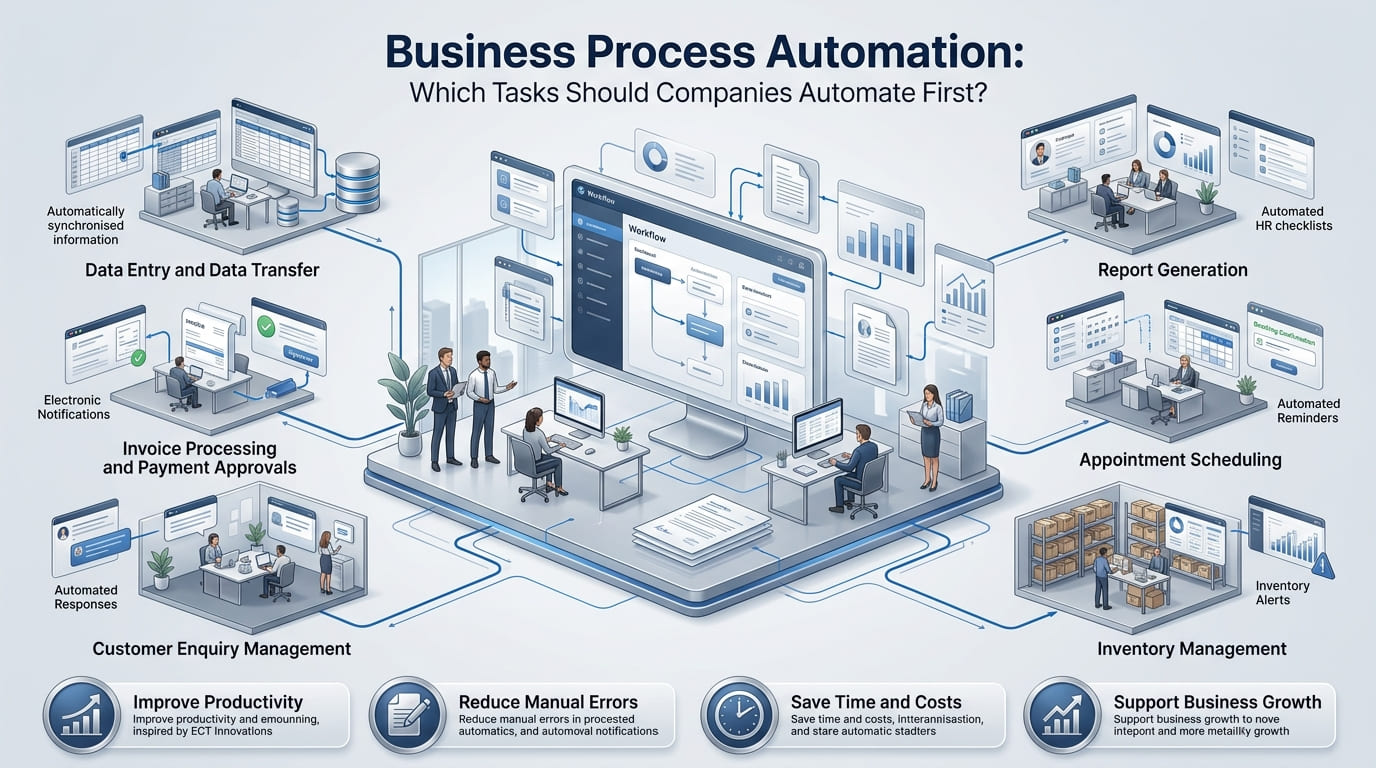
Businesses handle many repetitive tasks every day, from processing documents and updating spreadsheets to managing customer enquiries and preparing reports. Although these activities are necessary, performing them manually can consume valuable time and increase the risk of human error.
Business process automation helps companies use technology to streamline repetitive workflows, reduce manual work, and improve operational efficiency. However, not every task needs to be automated immediately. Understanding which processes offer the greatest potential benefits can help businesses prioritise their automation efforts and make better use of their resources.
What Is Business Process Automation?
Business process automation refers to the use of technology to perform repetitive business activities with minimal manual intervention. It helps organisations standardise workflows, reduce unnecessary steps, and improve the consistency of daily operations.
Businesses can use automation tools to connect applications, process information, send notifications, and trigger actions based on predefined rules.
Business process automation can cover areas such as:
-
Data entry and document processing
-
Invoice and payment workflows
-
Customer enquiry management
-
Employee onboarding
-
Report generation
-
Appointment scheduling
-
Email notifications and approvals
-
Inventory updates
The right automation approach depends on the complexity of the process, the tools already used by the business, and the desired operational outcomes.
Why Should Businesses Automate Repetitive Tasks?
Manual processes can become difficult to manage as a business grows. Employees may spend significant amounts of time completing routine administrative work instead of focusing on activities that require problem-solving, communication, and decision-making.
Business process automation can help organisations address these challenges by improving how work moves between employees, departments, and digital systems.
Some key benefits include:
-
Improved productivity: Reduce the time spent on repetitive activities.
-
Fewer manual errors: Apply consistent rules to routine tasks.
-
Faster workflows: Reduce delays caused by manual data transfers and approval requests.
-
Better visibility: Track process progress and identify bottlenecks.
-
More consistent operations: Standardise how recurring tasks are completed.
-
Better use of employee time: Allow teams to focus on higher-value responsibilities.
However, automation works best when businesses first understand and improve the processes they want to automate.
Which Tasks Should Companies Automate First?
Choosing the right tasks is an important step in business process automation. Businesses should begin with processes that are repetitive, time-consuming, rules-based, and relatively straightforward to standardise.
1. Data Entry and Data Transfer
Data entry is one of the most common tasks that businesses can consider automating.
Employees may need to transfer information between spreadsheets, customer management systems, online forms, and internal databases. Performing these activities manually can take time and introduce errors.
Automation can help businesses:
-
Transfer information between connected applications.
-
Update records when new information is received.
-
Validate required fields before processing.
-
Reduce duplicate data entry.
-
Notify employees when information is incomplete.
For example, information submitted through an online enquiry form could automatically be recorded in a customer database and assigned to the relevant team.
Before implementing automation, businesses should ensure that the source data is reliable and that the connected systems support the required integrations.
2. Invoice Processing and Payment Approvals
Financial administration often involves repetitive activities such as receiving invoices, checking details, requesting approvals, and updating accounting records.
Automating suitable parts of this workflow can help reduce administrative delays and improve tracking.
Businesses may automate:
-
Invoice receipt and document organisation.
-
Notifications when invoices require approval.
-
Routing invoices to the appropriate department.
-
Reminders for outstanding approvals.
-
Updates to invoice status records.
For example, an invoice submitted through a designated system could trigger an approval request to the responsible manager.
Financial controls should remain in place, particularly for payment authorisation, fraud prevention, and transactions that require human verification.
3. Customer Enquiry Management
Businesses often receive customer enquiries through websites, email, contact forms, and other communication channels. Managing these enquiries manually can lead to delayed responses or missed opportunities.
Business process automation can help organise incoming requests and ensure they reach the right team.
Possible automation tasks include:
-
Sending automatic enquiry acknowledgements.
-
Recording customer details in a CRM system.
-
Assigning enquiries based on predefined criteria.
-
Notifying sales teams about new leads.
-
Sending follow-up reminders.
-
Tracking enquiry status.
For example, a new website enquiry could automatically create a CRM record and notify the relevant sales representative.
Automation can improve response consistency, while employees remain responsible for handling complex questions and building customer relationships.
4. Employee Onboarding and HR Administration
Employee onboarding involves multiple activities, including collecting employee information, preparing documents, arranging equipment, and coordinating access to business systems.
When these tasks are managed separately, important steps can be delayed or overlooked.
Businesses can automate parts of the onboarding process by:
-
Sending welcome emails and onboarding instructions.
-
Creating task lists for HR and IT teams.
-
Notifying departments about new employees.
-
Scheduling training sessions.
-
Tracking document submission.
-
Reminding employees about outstanding requirements.
For example, once a new employee’s start date is confirmed, an automated workflow could notify HR and IT to prepare the necessary documentation and equipment.
Sensitive employee information should be handled through appropriate access controls and secure systems.
5. Report Generation and Data Collection
Many businesses prepare regular reports to monitor sales, operational performance, expenses, and other key metrics.
Collecting information from multiple sources and formatting reports manually can become repetitive, especially when the same reports are required every week or month.
Automation can support this process by:
-
Collecting information from connected data sources.
-
Updating reporting datasets on a defined schedule.
-
Generating recurring report outputs.
-
Sending notifications when reports are ready.
-
Distributing reports to authorised recipients.
For example, a business could automate the collection of sales figures from supported systems and prepare updated information for a management dashboard.
Employees should still review important reports to confirm data accuracy and interpret the findings correctly.
6. Appointment Scheduling and Reminders
Businesses that manage consultations, meetings, service appointments, or training sessions often spend time coordinating schedules and sending reminders.
Automating suitable scheduling tasks can help reduce administrative work and improve communication.
Possible automation opportunities include:
-
Sending appointment confirmations.
-
Issuing reminders before scheduled sessions.
-
Updating calendars when appointments change.
-
Notifying employees about new bookings.
-
Sending follow-up messages after appointments.
These workflows can be particularly useful for service providers that manage a high volume of appointments.
Businesses should ensure that automated reminders use accurate scheduling information and respect customer communication preferences.
7. Inventory and Stock Updates
Businesses that manage physical products often need to monitor inventory levels, record stock movements, and notify staff when supplies are running low.
Manual inventory updates can create inconsistencies between actual stock levels and recorded information.
Automation may help businesses:
-
Update inventory records following confirmed transactions.
-
Notify staff when stock reaches a defined threshold.
-
Generate stock movement reports.
-
Flag unusual inventory changes.
-
Create tasks for stock replenishment reviews.
For example, an inventory system could notify the purchasing team when an item reaches its reorder threshold.
The effectiveness of inventory automation depends on reliable transaction records, accurate stock data, and appropriate system integration.
How to Decide Which Business Processes to Automate First
Businesses do not need to automate every process at once. A structured assessment can help identify tasks that offer meaningful benefits without introducing unnecessary complexity.
Evaluate How Often the Task Occurs
Tasks performed daily or multiple times a week may offer more opportunities for time savings than activities performed only occasionally.
Identify processes that employees repeatedly complete and determine how much time they currently require.
Measure the Risk of Manual Errors
Some processes involve repetitive data entry, copying information, or following standard procedures. If these activities frequently result in mistakes, automation may help improve consistency.
However, processes involving complex judgement or sensitive decisions may require additional human oversight.
Assess the Complexity of the Workflow
Simple, rules-based processes are generally easier to automate than workflows involving numerous exceptions, unclear responsibilities, or disconnected systems.
Businesses should document the current process before deciding how to automate it.
Consider the Potential Return on Investment
Automation may involve software subscriptions, implementation costs, employee training, and ongoing maintenance.
Compare these costs against the expected benefits, such as reduced processing time, fewer errors, improved service levels, and better use of employee resources.
Check System Compatibility
Automation depends on the ability of existing systems to exchange information or trigger actions.
Businesses should evaluate available integrations, API support, security requirements, and software limitations before selecting an automation solution.
Which Tools Can Businesses Use for Process Automation?
Different automation tools support different business requirements. The appropriate choice depends on the applications involved, workflow complexity, budget, and internal technical capabilities.
Some common options include:
-
Microsoft Power Automate: Helps users create workflows between supported applications, automate notifications, and streamline approval processes.
-
Zapier: Connects supported web applications to automate actions between different online services.
-
Make: Provides visual workflow automation for connecting applications and designing multi-step processes.
-
Robotic Process Automation (RPA) tools: Can automate certain repetitive interactions with software interfaces, particularly when existing systems lack suitable integration options.
-
CRM and business management platforms: Many systems include built-in automation features for lead assignment, reminders, task management, and record updates.
Before choosing a tool, businesses should review its capabilities, pricing, integration requirements, security features, and suitability for their existing technology environment.
Common Mistakes to Avoid When Automating Business Processes
Although automation can improve efficiency, poor implementation may create additional problems.
Businesses should avoid the following mistakes:
-
Automating inefficient workflows: Improving an unclear or unnecessarily complicated process may simply make the same problems happen faster.
-
Choosing tools without clear objectives: Technology should address a specific operational need rather than being introduced without a defined purpose.
-
Ignoring employee training: Employees need to understand how automated workflows operate and what to do when something goes wrong.
-
Overlooking data security: Automation must follow appropriate access controls, data protection practices, and organisational policies.
-
Removing necessary human checks: High-risk decisions, financial approvals, and unusual cases may still require human review.
-
Failing to monitor results: Businesses should review workflow performance and update automation when requirements change.
Starting with a small, well-defined process can help organisations test their approach before expanding automation to other areas.
How Business Process Automation Supports Business Growth
As businesses expand, the number of transactions, customer enquiries, internal requests, and administrative activities often increases.
Business process automation can help organisations manage this growth by reducing repetitive work and creating more consistent workflows.
Employees can spend less time on routine administration and more time on activities that require expertise, communication, and problem-solving. Standardised workflows can also make it easier to track responsibilities and identify operational bottlenecks.
For Malaysian businesses, adopting suitable automation solutions can support digital transformation and improve operational efficiency without requiring every task to be managed manually.
The best results come from combining appropriate technology with clear processes, reliable data, employee training, and regular performance reviews.
Conclusion
Business process automation helps companies streamline repetitive tasks, reduce manual work, and improve operational consistency. From data entry and invoice processing to customer enquiry management and report generation, many routine business activities can be improved through carefully planned automation.
Businesses should begin by identifying processes that occur frequently, follow clear rules, and consume significant employee time. Evaluating costs, system compatibility, security requirements, and potential benefits can help organisations prioritise the right opportunities.
With a structured approach, business process automation can help businesses improve productivity, manage growing workloads, and build more efficient operations.
FAQs
1. What is business process automation?
Business process automation is the use of technology to perform repetitive business activities with minimal manual intervention. It helps organisations standardise workflows, reduce unnecessary steps, and improve the consistency of daily operations.
2. Which tasks should companies automate first?
Companies should start with tasks that are repetitive, time-consuming, rules-based, and relatively straightforward to standardise. Common examples include data entry, invoice processing, customer enquiry management, employee onboarding, report generation, appointment scheduling, and inventory updates.
3. How do I know if a task is suitable for automation?
A task is generally suitable for automation if it occurs frequently, follows clear rules, involves repetitive data handling, and consumes significant employee time. Processes involving complex judgement or sensitive decisions may require additional human oversight.
4. What tools can businesses use for process automation?
Common tools include Microsoft Power Automate, Zapier, Make, Robotic Process Automation (RPA) tools, and built-in automation features within CRM and business management platforms. The best choice depends on your applications, workflow complexity, budget, and technical capabilities.
5. What mistakes should businesses avoid when automating processes?
Businesses should avoid automating inefficient workflows, choosing tools without clear objectives, ignoring employee training, overlooking data security, removing necessary human checks, and failing to monitor results. Starting with a small, well-defined process can help test the approach before expanding.