What Is Microsoft 365 for Business?
Microsoft 365 for Business is a cloud-based productivity solution that provides businesses with access to various Microsoft applications and services.
Unlike traditional software that you install once on a single computer, Microsoft 365 operates on a subscription model. This means businesses pay a recurring fee (monthly or annually) to access the latest versions of Microsoft applications. Updates, security patches, and new features are delivered automatically, so businesses do not need to worry about manual upgrades.
Because it is cloud-based, employees can access their tools and files from different devices, including laptops, desktops, tablets, and smartphones. This makes it particularly useful for modern businesses that support flexible working arrangements.
Depending on the plan, businesses can use tools such as:
Microsoft Word
A word processing application used for creating documents such as reports, proposals, contracts, letters, and internal memos. Word includes formatting tools, templates, and collaboration features that allow multiple people to edit the same document.
Microsoft Excel
A spreadsheet application used for data management, financial calculations, budgeting, reporting, and analysis. Excel is widely used across industries, from finance and accounting to operations and sales.
Microsoft PowerPoint
A presentation application used for creating slideshows for meetings, pitches, training sessions, and conferences. PowerPoint includes design templates, animation tools, and the ability to present online.
Microsoft Outlook
An email and calendar management application used for sending and receiving business emails, scheduling meetings, managing contacts, and organizing daily tasks. Outlook integrates with other Microsoft 365 tools for a seamless experience.
Microsoft Teams
A communication and collaboration platform that combines chat, video meetings, file sharing, and app integration. Teams is designed to be a central hub for teamwork, allowing employees to communicate and collaborate in one place.
OneDrive
A cloud storage service that allows employees to store, sync, and share files. OneDrive provides access to files from any device with an internet connection, making it easy to work remotely.
SharePoint
A web-based collaboration and document management platform. SharePoint allows businesses to create shared workspaces, manage documents, and build internal websites for teams or departments.
These tools allow employees to create documents, communicate with colleagues, manage files, and collaborate from different locations.
The key advantage is integration. Because these tools are designed to work together, information can flow between them. For example, a document created in Word can be shared via Teams, stored in OneDrive, and accessed through SharePoint. This connected experience reduces friction and helps employees work more efficiently.
Improve Workplace Communication
Effective communication is important for businesses of all sizes. Employees need reliable ways to communicate with colleagues, clients, and different departments.
Poor communication can lead to misunderstandings, missed deadlines, duplicated work, and frustrated employees. In contrast, clear and efficient communication helps teams stay aligned, make better decisions, and respond faster to customer needs.
Microsoft 365 supports workplace communication through tools such as Microsoft Outlook and Microsoft Teams.
Microsoft Outlook is primarily used for email communication. It allows employees to send and receive messages, attach files, schedule meetings, and manage their calendars. Outlook also includes features like shared calendars, meeting invitations, and task management, making it a central hub for professional communication.
Microsoft Teams takes communication further by offering instant messaging, voice calls, video meetings, and channels for team discussions. Employees can send quick messages, start group chats, or hold virtual meetings without leaving the platform. Teams also integrates with other Microsoft 365 apps, so users can share files and collaborate directly within a conversation.
Businesses can use these tools to:
-
Send and manage business emails – Organize inboxes, set up folders, create rules, and manage communications professionally.
-
Schedule meetings – Use shared calendars to find available times, send invitations, and set reminders.
-
Communicate with teams – Use channels and chats to keep team conversations organized and accessible.
-
Share information – Send files, links, and updates instantly without switching between apps.
-
Organize calendars – Manage personal and team schedules, track appointments, and coordinate availability.
Having communication tools within the same ecosystem can make it easier for employees to manage their daily responsibilities.
Instead of using one tool for email, another for messaging, and yet another for meetings, employees can work within a unified environment. This reduces the learning curve, minimizes context switching, and helps ensure that important information is not lost between different platforms.
For Malaysian companies with teams spread across different offices or working remotely, this integrated approach to communication can significantly improve coordination and responsiveness.
Support Team Collaboration
Employees often need to work together on documents, presentations, spreadsheets, and other files.
In traditional workflows, collaboration often meant sending files back and forth via email. One person would edit a document, save it, and send it to another person, who would then make their own changes and send it back. This process is not only slow but also prone to errors. Multiple versions of the same file can exist, and it becomes difficult to track who made what changes.
Microsoft 365 allows teams to collaborate using cloud-based applications.
With real-time co-authoring, multiple employees can work on the same document at the same time. Changes are saved automatically, and everyone sees the latest version. This eliminates the confusion of version control and speeds up the review and approval process.
Employees can:
-
Share documents – Send files to colleagues with specific permissions (view, edit, or comment).
-
Work on files together – Multiple people can edit Word, Excel, and PowerPoint files simultaneously.
-
Add comments and feedback – Reviewers can leave comments, suggestions, and notes directly in the document.
-
Track document changes – See who made changes, when, and what was modified using version history.
-
Access files from different devices – Work on documents from a laptop, tablet, or smartphone.
This can help reduce the need to send multiple versions of the same document through email.
For example, a marketing team preparing a proposal can work on the same PowerPoint file at the same time. One person can focus on the design, another on the content, and a third on the budget slides. All changes are synced in real time, and the final version is always up to date.
Similarly, a finance team can collaborate on an Excel spreadsheet for budgeting. Instead of waiting for one person to finish before another can start, team members can work on different sections simultaneously, speeding up the entire process.
This level of collaboration is particularly valuable for Malaysian companies that work across different time zones, have remote team members, or manage projects with tight deadlines.
Access Files From Anywhere
Modern businesses may have employees working from offices, homes, or different locations.
The traditional approach of storing files on a local computer or office server has limitations. If an employee is not in the office, they may not be able to access important files. If a computer crashes, data could be lost. If a team member needs a file urgently, they may have to wait until someone sends it.
Cloud storage services such as OneDrive allow employees to access business files through supported devices and internet connections.
OneDrive stores files in the cloud, which means they are not tied to a single physical location. Employees can access their files from any device with an internet connection, whether they are in the office, at home, or travelling.
Businesses can use cloud file storage to:
-
Store important documents – Keep contracts, reports, presentations, and other business files in a secure cloud environment.
-
Share files with team members – Send files or folders to colleagues with specific access permissions.
-
Access files remotely – Retrieve documents from any location, making remote work more practical.
-
Organize business information – Create folders, use naming conventions, and keep files structured.
-
Reduce reliance on local storage – Minimize the risk of data loss due to hardware failure.
This flexibility can be useful for businesses that support remote or hybrid working arrangements.
For Malaysian companies, this is particularly relevant as more businesses adopt flexible work policies. Employees can work from home, from a client’s office, or while travelling, and still have access to the files they need.
Cloud storage also improves business continuity. If an office is temporarily inaccessible due to an emergency, employees can continue working from other locations because their files are stored in the cloud.
Additionally, OneDrive includes features like file recovery and version history, which means accidental deletions or changes can be reversed. This adds an extra layer of protection for important business data.
Improve Productivity With Microsoft Excel
Microsoft Excel remains an important tool for many businesses.
Despite the rise of many new software applications, Excel continues to be one of the most widely used tools for data management and analysis. Its flexibility, powerful calculation capabilities, and familiar interface make it indispensable for many job functions.
Employees use Excel for tasks such as:
-
Data management – Organize, sort, filter, and manage large datasets.
-
Financial calculations – Perform budgeting, forecasting, and financial modelling.
-
Business reports – Create reports with charts, tables, and summaries.
-
Sales tracking – Monitor sales performance, track leads, and analyze trends.
-
Data analysis – Use formulas, pivot tables, and functions to extract insights from data.
-
Planning and forecasting – Build models to predict future performance and plan resources.
Microsoft 365 provides access to Excel alongside other productivity tools, allowing employees to work with business data while keeping their workflows connected to the wider Microsoft ecosystem.
One of the key advantages of Excel in Microsoft 365 is cloud integration. Spreadsheets can be stored in OneDrive or SharePoint, shared with colleagues, and edited collaboratively. This means multiple team members can work on the same spreadsheet at the same time, which is particularly useful for budgeting, planning, and reporting tasks.
Excel in Microsoft 365 also includes advanced features like:
-
Ideas in Excel – An AI-powered tool that suggests insights and trends from your data.
-
Dynamic arrays – More powerful formulas that can handle complex calculations.
-
XLOOKUP and other new functions – Improved functions for data lookup and manipulation.
-
Power Query – Tools for importing, cleaning, and transforming data from various sources.
For Malaysian businesses, Excel remains a critical tool for finance, operations, sales, and management. By integrating Excel into the broader Microsoft 365 ecosystem, businesses can ensure that their data workflows are connected, secure, and accessible.
Make Online Meetings Easier
Microsoft Teams provides businesses with tools for online meetings, communication, and collaboration.
Online meetings have become a standard part of business operations. Whether it is a team check-in, a client presentation, a training session, or a project review, virtual meetings allow people to connect regardless of their physical location.
Microsoft Teams offers a comprehensive set of meeting features:
-
Video meetings – Host or join video calls with colleagues, clients, and partners. Meetings can include screen sharing, virtual backgrounds, and recording.
-
Team discussions – Use channels and chats for ongoing conversations, questions, and updates.
-
File sharing – Share documents, presentations, and other files directly within a meeting or chat.
-
Online collaboration – Work together on files in real time during or after a meeting.
-
Internal communication – Keep team communications organized and searchable.
Teams can be used for:
-
Video meetings – Conduct face-to-face virtual meetings with high-quality video and audio.
-
Team discussions – Create channels for different projects, departments, or topics.
-
File sharing – Share and collaborate on documents without leaving the platform.
-
Online collaboration – Use whiteboards, breakout rooms, and co-editing features.
-
Internal communication – Replace or supplement email with faster, more direct messaging.
For Malaysian companies with employees, customers, or business partners in different locations, online meeting tools can help teams communicate without always needing face-to-face meetings.
This is particularly valuable for businesses with offices in different states or regions. Instead of travelling for hours to attend a meeting, employees can join a video call and participate fully. This saves time, reduces travel costs, and allows for more frequent communication.
Teams also supports integration with other Microsoft 365 apps. During a meeting, users can share a Word document, present an Excel spreadsheet, or collaborate on a PowerPoint presentation without switching between applications.
Meeting recordings, transcripts, and notes are also available, making it easier to review discussions and share information with team members who could not attend.
Organize Business Documents
Managing large numbers of business documents can become difficult when files are stored across different locations.
In many companies, documents end up scattered across different computers, email inboxes, shared drives, and personal folders. This makes it hard to find the right version of a file, track changes, or ensure that everyone is working with the latest information.
Microsoft 365 tools such as OneDrive and SharePoint can help businesses organize and manage digital documents.
OneDrive is ideal for personal file storage and sharing. Each employee gets their own OneDrive space, which they can use to store their work files and share them with colleagues when needed.
SharePoint is designed for team and organizational document management. It allows businesses to create shared sites and libraries where teams can store, organize, and collaborate on documents.
Businesses can use these platforms to:
-
Organize company files – Create a structured folder system for different departments, projects, or document types.
-
Share documents – Give team members access to files with specific permissions.
-
Manage access permissions – Control who can view, edit, or share documents.
-
Create shared workspaces – Build team sites for collaboration on projects or ongoing work.
-
Improve document accessibility – Make it easy for employees to find the files they need.
A more organized document management process can help employees spend less time searching for important information.
Instead of asking colleagues to send a file or searching through old emails, employees can go directly to a shared library and find what they need. This saves time and reduces frustration.
SharePoint also includes features like:
-
Version history – Track changes and restore previous versions of a document.
-
Metadata and tagging – Add descriptive information to files for easier searching.
-
Workflows – Automate document approval and review processes.
-
Search – Find documents quickly using keywords, dates, or other criteria.
For Malaysian businesses, effective document management is essential for compliance, audits, and day-to-day operations. By using OneDrive and SharePoint, companies can create a more organized and efficient digital workplace.
Improve Workplace Efficiency
Using connected productivity tools can help businesses streamline everyday tasks.
Efficiency is about doing things faster, better, and with less wasted effort. When employees have to switch between multiple tools, search for information, or wait for colleagues to respond, efficiency suffers.
Microsoft 365 can support employees with:
-
Faster communication – Instant messaging, video calls, and integrated email reduce delays.
-
Easier document sharing – Share files directly from the app you are working in.
-
Simplified collaboration – Work together on files in real time without version confusion.
-
Centralized file access – Find all your files in one place, accessible from any device.
-
More flexible working arrangements – Work from anywhere without losing access to tools or data.
When employees can access the tools and information they need more easily, they can spend more time focusing on their core responsibilities.
For example, a sales team can use Teams to communicate with clients, SharePoint to access product information, and Excel to track sales performance. All these tools are connected, so information flows smoothly between them.
A project team can use Planner (a task management tool in Microsoft 365) to assign tasks, Teams to discuss progress, and OneDrive to share files. Everyone knows what they need to do and has access to the resources they need.
This connected approach reduces the time spent on administrative tasks and allows employees to focus on work that adds value to the business.
Support Remote and Hybrid Work
Remote and hybrid working have changed how many businesses manage their teams.
The COVID-19 pandemic accelerated the shift towards remote work, and many businesses have continued with hybrid arrangements even after returning to the office. This means employees may split their time between working from home and working in the office.
Microsoft 365 provides cloud-based tools that allow employees to communicate, collaborate, and access files without always being in the same physical location.
Businesses can use Microsoft 365 to support:
-
Remote employees – Employees who work primarily from home or other locations outside the office.
-
Hybrid teams – Teams where some members work in the office and others work remotely.
-
Online meetings – Virtual meetings that bring together participants from different locations.
-
Cloud collaboration – Real-time collaboration on documents and projects.
-
Remote document access – Access to files from any device with an internet connection.
This can help businesses maintain productivity while providing employees with greater flexibility in how they work.
For Malaysian companies, supporting remote and hybrid work can bring several benefits:
-
Access to wider talent pools – Hire employees regardless of their location.
-
Improved work-life balance – Employees can manage their schedules more flexibly.
-
Reduced office costs – Less need for physical office space.
-
Increased productivity – Employees can work in environments where they are most productive.
-
Business continuity – Operations can continue even if the office is inaccessible.
Microsoft 365 provides the infrastructure needed to make remote and hybrid work successful. Employees can communicate, collaborate, and access files as if they were in the same office.
Improve Business Data Security
Business documents and information need to be managed carefully.
Data breaches, cyberattacks, and accidental data loss can have serious consequences for businesses. Customer information, financial records, intellectual property, and other sensitive data need to be protected.
Microsoft 365 includes security and administration features that can help businesses manage access to company information.
These features include:
-
Multi-factor authentication (MFA) – Require additional verification beyond a password to access accounts.
-
Data encryption – Protect data both at rest and in transit.
-
Threat protection – Detect and block malware, phishing, and other threats.
-
Data loss prevention (DLP) – Prevent sensitive information from being shared inappropriately.
-
Mobile device management (MDM) – Manage and secure mobile devices accessing company data.
Businesses can establish controls for:
-
User accounts – Manage who has access to what, and enforce strong password policies.
-
File access – Control who can view, edit, or share specific files and folders.
-
Business data – Classify, protect, and monitor sensitive information.
-
Devices – Ensure that devices accessing company data meet security requirements.
-
Collaboration environments – Manage how employees communicate and share information.
The specific security features available depend on the Microsoft 365 plan and configuration used by the business.
For Malaysian companies, data security is not just a technical concern but also a business and legal one. Compliance with regulations like the Personal Data Protection Act (PDPA) requires businesses to protect personal data. Microsoft 365 provides tools to help meet these requirements.
Additionally, Microsoft invests heavily in security research and development, and its cloud infrastructure is designed to meet high security standards. This gives businesses confidence that their data is protected.
Integrate Microsoft 365 With Other Business Tools
Businesses often use multiple digital systems to manage their operations.
A typical Malaysian company might use a CRM system for sales, an accounting system for finance, a project management tool for operations, and various other applications for different functions.
Microsoft 365 can work alongside other business applications and services to support different workflows.
This integration allows data and processes to flow between systems, reducing manual work and improving efficiency.
For example, businesses can connect Microsoft 365 with:
-
CRM platforms – Sync customer data, create tasks from emails, and track interactions.
-
Business databases – Connect Excel to external databases for reporting and analysis.
-
Workflow automation tools – Use Power Automate to create automated workflows between Microsoft 365 and other apps.
-
Forms – Create online forms with Microsoft Forms and automatically store responses in Excel or SharePoint.
-
Project management systems – Integrate with tools like Planner, Project, or third-party solutions.
Integration can help reduce repetitive work and create more connected business processes.
For example, when a customer fills out a form on your website, the data can be automatically added to a SharePoint list, a task can be created in Planner, and a notification can be sent via Teams. This kind of automation saves time and reduces the risk of errors.
Microsoft Power Platform (Power Automate, Power Apps, Power BI) provides additional tools for building custom solutions and integrating Microsoft 365 with other systems.
For Malaysian businesses looking to improve efficiency and reduce manual work, integration is a key consideration. Microsoft 365 provides the flexibility to connect with existing systems and build more streamlined workflows.
How Malaysian Companies Can Get Started With Microsoft 365
Businesses should first identify the areas where employees spend the most time on repetitive or manual tasks.
Before adopting Microsoft 365, it is important to understand your current workflows and identify pain points. What tasks take too long? Where do errors occur? What information is hard to find? What communication challenges exist?
Companies can then determine which Microsoft 365 applications can support those needs.
A simple approach is to:
1. Identify productivity challenges
Talk to employees and managers to understand where time is being wasted. Look for patterns like repeated data entry, difficulty finding files, or slow approval processes.
2. Review existing workflows
Map out how work currently gets done. Identify steps that could be automated, simplified, or eliminated.
3. Select suitable Microsoft 365 tools
Based on your challenges and workflows, choose the Microsoft 365 applications that will have the most impact. For example, if communication is a problem, focus on Teams. If document management is an issue, start with SharePoint.
4. Train employees
Provide training and support to help employees learn how to use the new tools. This could include workshops, online courses, or one-on-one coaching.
5. Establish security policies
Define how data should be protected, who has access to what, and what employees should and should not do with company information.
6. Monitor productivity improvements
Track metrics like time saved, errors reduced, or employee satisfaction to measure the impact of Microsoft 365.
Proper planning and employee training can help businesses get more value from their Microsoft 365 investment.
Many Malaysian companies work with technology partners like ECT Innovations to help with planning, implementation, and training. A partner can provide expertise, guidance, and support throughout the adoption process.
Why Businesses Should Consider Microsoft 365 for Business
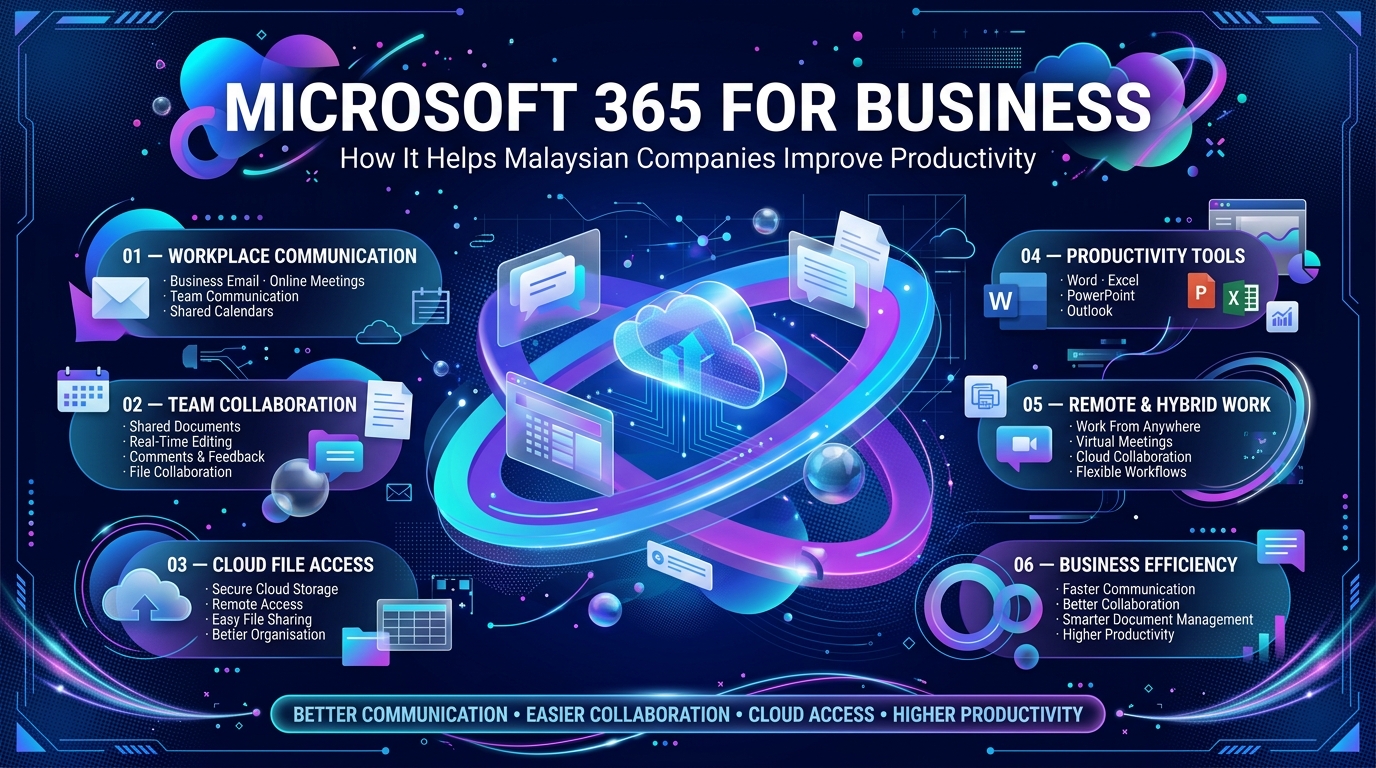
Microsoft 365 can provide businesses with a range of tools for communication, collaboration, document management, and productivity.
The potential benefits include:
✔ Better workplace communication – Integrated email, chat, and video meetings.
✔ Easier team collaboration – Real-time co-authoring and file sharing.
✔ Cloud-based file access – Access files from any device, anywhere.
✔ Improved document management – Organized, searchable, and secure document storage.
✔ Support for remote work – Tools designed for flexible working arrangements.
✔ Greater workplace productivity – Streamlined workflows and reduced manual tasks.
For Malaysian companies, choosing the right Microsoft 365 tools can help create a more connected and efficient digital workplace.
In a competitive business environment, productivity and efficiency are key differentiators. Companies that can communicate faster, collaborate more effectively, and manage information better are better positioned to succeed.
Microsoft 365 provides the tools and infrastructure to support these goals. Whether you are a small startup or a large enterprise, there are plans and configurations to meet your needs.
Conclusion
Microsoft 365 for Business provides a range of tools that can help Malaysian companies improve communication, collaboration, file management, and everyday productivity. Whether a business operates in Kuala Lumpur, Penang, or Johor Bahru, the challenges are often similar — teams need to stay connected, documents need to be organized, and workflows need to run smoothly. Microsoft 365 addresses these challenges by bringing essential productivity tools into one integrated platform. Instead of relying on separate applications for email, messaging, file storage, and document editing, businesses can use a connected ecosystem that reduces friction and helps employees focus on their work. By using the right applications and workflows, businesses can create a more organized digital workplace while helping employees work more efficiently. For example, a document created in Word can be shared via Teams, stored in SharePoint, and accessed through OneDrive. This integration reduces the time employees spend searching for files, switching between applications, or waiting for responses, allowing them to make better decisions and respond faster to customer needs.
From Microsoft Teams for communication and collaboration, to OneDrive and SharePoint for document management, to Excel for data analysis, Microsoft 365 offers a comprehensive suite of tools for modern businesses. Teams enables video meetings, instant messaging, and team discussions, making it easier for employees to stay connected regardless of their location. OneDrive and SharePoint provide secure, cloud-based storage that supports remote and hybrid work arrangements. Excel remains a powerful tool for data management, reporting, and analysis. The key is to understand your business needs, choose the right tools, and invest in training and support to ensure successful adoption. Companies should start by identifying their biggest productivity challenges and then select the Microsoft 365 applications that address those specific needs. Training is equally important so employees can use the tools effectively and adapt to new ways of working.
For Malaysian companies looking to improve productivity and embrace digital transformation, Microsoft 365 is a powerful and flexible solution. It scales with your business, supports a wide range of work styles, and integrates with other systems you may already be using. Whether you are a small startup or a large enterprise, Microsoft 365 provides the tools and infrastructure to support your goals. In a competitive business environment, the ability to communicate faster, collaborate more effectively, and manage information better can be a significant advantage. By adopting Microsoft 365 with proper implementation and training, Malaysian companies can create a more connected, efficient, and productive workplace.
FAQs
1. What is Microsoft 365 for Business?
Microsoft 365 for Business is a cloud-based subscription service that provides access to a suite of productivity applications including Word, Excel, PowerPoint, Outlook, Teams, OneDrive, and SharePoint. It is designed to help businesses of all sizes communicate, collaborate, and manage their work more efficiently from any location. Unlike traditional software, Microsoft 365 is regularly updated with new features and security patches.
2. How can Microsoft 365 improve team collaboration?
Microsoft 365 improves collaboration through features like real-time co-authoring, which allows multiple team members to work on the same document simultaneously. Tools like Microsoft Teams and SharePoint provide centralized platforms for file sharing, discussions, and project management. This reduces the need for emailing file versions back and forth and ensures everyone is working with the latest information.
3. Is Microsoft 365 suitable for remote and hybrid work in Malaysia?
Yes, Microsoft 365 is ideal for remote and hybrid work. Its cloud-based nature means employees can access their files, emails, and applications from any device with an internet connection. Microsoft Teams facilitates online meetings, chat, and collaboration, helping remote teams stay connected and productive. OneDrive and SharePoint ensure that files are accessible from anywhere.
4. What are the security features of Microsoft 365 for Business?
Microsoft 365 includes robust security features such as multi-factor authentication (MFA), data encryption, advanced threat protection, data loss prevention (DLP), and mobile device management. These features help businesses protect sensitive data, manage user access, and secure their digital environment. Specific features may vary by subscription plan, so it is important to choose a plan that meets your security requirements.
5. How can a Malaysian company get started with Microsoft 365?
To get started, a company should first identify its key productivity challenges and review existing workflows. Then, with the help of a certified partner like ECT Innovations, they can select the right Microsoft 365 plan, plan a phased implementation, migrate data, train employees, and establish security policies. Proper planning and training are essential for a smooth transition and successful adoption.