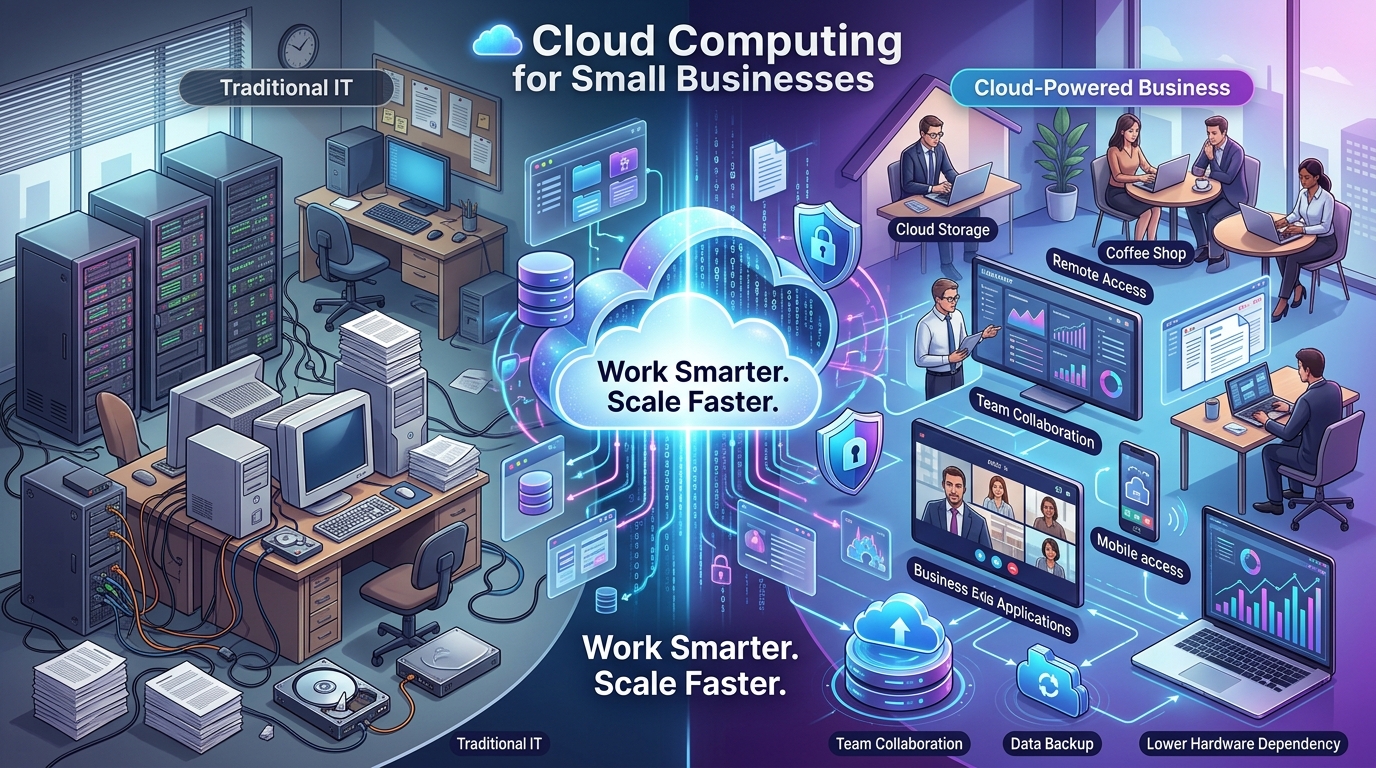
Cloud computing has transformed the way businesses store information, manage applications, communicate with employees, and operate their digital systems. Instead of depending entirely on physical servers and computers, businesses can access technology resources through secure internet-based platforms.
For small businesses, this can provide greater flexibility without requiring a large investment in physical IT infrastructure. Employees can access important files and applications from different locations, while businesses can increase or reduce their technology resources as their needs change.
However, there are many cloud computing platforms for small businesses, and each platform is designed for different requirements. Some focus on cloud infrastructure, while others specialize in productivity, collaboration, storage, or business applications. Understanding these differences can help small businesses choose a platform that fits their operations, budget, and long-term goals.
What Is Cloud Computing?
Cloud computing refers to the delivery of computing resources and technology services through the internet. Instead of storing everything locally or operating physical servers within an office, businesses can use cloud-based services to access and manage their digital resources.
Cloud computing can provide access to:
- Cloud storage
- Computing resources
- Business applications
- Database services
- Backup and recovery solutions
- Communication and collaboration tools
The main advantage is that businesses can access these resources without having to manage all of the underlying physical infrastructure themselves.
Why Is Cloud Computing Important for Small Businesses?
Small businesses often need to balance their technology requirements with limited budgets, staff, and IT resources. Traditional infrastructure can require businesses to purchase hardware, maintain servers, manage software, and plan for future capacity.
Cloud computing for small businesses provides an alternative approach by allowing organizations to access technology services according to their requirements.
Cloud computing can help businesses:
- Reduce dependence on physical hardware
- Access business information remotely
- Improve employee collaboration
- Scale technology resources more easily
- Support remote and hybrid working
- Simplify data backup and recovery
This flexibility can make cloud technology a practical option for businesses looking to modernize their IT environment.
What Should Small Businesses Consider Before Choosing a Cloud Platform?
Choosing one of the best cloud computing platforms requires more than comparing monthly prices. Businesses should understand what they actually need from their cloud environment before selecting a provider.
Important factors to consider include:
- Business requirements
- Security features
- Storage capacity
- Scalability
- Existing software integration
- Number of users
- Ease of use
- Technical support
- Overall cost
Businesses should also consider future requirements. A platform that meets today’s needs may become unsuitable if the company grows significantly or introduces new applications and services.
Microsoft Azure for Scalable Cloud Infrastructure
Microsoft Azure is a cloud computing platform that provides infrastructure, storage, database, networking, application hosting, and other technology services.
Azure can be suitable for businesses that require scalable cloud infrastructure for business or already rely heavily on Microsoft technologies.
Businesses can use Azure for:
- Virtual machines
- Cloud storage
- Database services
- Application hosting
- Backup and disaster recovery
- Network infrastructure
Azure allows businesses to adjust their cloud resources according to their operational requirements. This can be useful for organizations that expect their technology needs to change as they grow.
Amazon Web Services for Flexible Cloud Computing
Amazon Web Services, commonly known as AWS, provides a broad range of cloud computing services for businesses of different sizes.
AWS can support requirements such as:
- Cloud computing
- Data storage
- Database management
- Application hosting
- Networking
- Security
One of the major strengths of AWS is the wide range of available services. Businesses can select the resources they require rather than adopting a single fixed infrastructure package.
For small businesses, however, careful planning is important. Cloud costs can vary depending on storage, computing usage, databases, networking, and other services being used.
Google Cloud for Data and Digital Applications
Google Cloud provides cloud infrastructure and services for computing, storage, databases, analytics, application development, and other digital requirements.
Businesses can use Google Cloud for:
- Cloud storage
- Data analytics
- Application hosting
- Database management
- Computing resources
- Artificial intelligence and machine learning applications
Google Cloud can be particularly relevant for businesses that work with large amounts of data or operate digital applications that require scalable computing resources.
Microsoft 365 for Business Productivity
Microsoft 365 provides cloud-based productivity and collaboration tools that are widely used by businesses.
Its applications include:
- Microsoft Word
- Microsoft Excel
- Microsoft PowerPoint
- Microsoft Teams
- OneDrive
- Outlook
Microsoft 365 allows employees to access documents, communicate with colleagues, share files, and collaborate from different locations.
For small businesses that already use Microsoft Office applications, Microsoft 365 can provide a familiar way to introduce small business cloud services into everyday operations.
Google Workspace for Team Collaboration
Google Workspace provides cloud-based productivity and communication applications designed to help teams work together.
Its main applications include:
- Gmail
- Google Drive
- Google Docs
- Google Sheets
- Google Meet
- Google Calendar
One of the main advantages of Google Workspace is real-time collaboration. Multiple employees can work on documents, spreadsheets, and other files while sharing information through cloud-based services.
This makes Google Workspace particularly useful for small businesses with remote and hybrid employees.
Dropbox Business for Cloud Storage and File Sharing
Dropbox Business focuses primarily on cloud storage, file synchronization, file sharing, and collaboration.
Businesses can use cloud storage to:
- Store important business documents
- Share files with employees
- Synchronize files across devices
- Manage access permissions
- Support team collaboration
For organizations that primarily require reliable cloud storage for small business, a dedicated storage platform can simplify document management and make files easier to access.
Zoho for Integrated Business Applications
Zoho provides a collection of cloud-based applications designed to support different business functions.
Its solutions can cover areas such as:
- Customer relationship management
- Accounting
- Project management
- Marketing
- Human resources
- Sales management
Small businesses that want multiple business applications within a connected ecosystem may consider Zoho as part of their broader business cloud solutions strategy.
Comparing the Best Cloud Computing Platforms
Different platforms provide different capabilities, so businesses should choose based on their specific requirements.
Some key strengths include:
- Microsoft Azure – Suitable for scalable cloud infrastructure, computing, storage, databases, and Microsoft-based environments.
- Amazon Web Services – Suitable for businesses that require a broad selection of flexible cloud infrastructure services.
- Google Cloud – Suitable for computing, data analytics, storage, databases, and digital applications.
- Microsoft 365 – Suitable for productivity, communication, document management, and Microsoft-based collaboration.
- Google Workspace – Suitable for cloud-based communication, productivity, file management, and real-time collaboration.
- Dropbox Business – Suitable for cloud storage, file synchronization, and file sharing.
- Zoho – Suitable for businesses looking for integrated cloud-based applications.
There is no single platform that is automatically the best choice for every small business. The right option depends on the organization’s technology requirements, budget, existing systems, security needs, and future growth.
How Cloud Computing Can Improve Business Productivity
Cloud technology can make important business resources easier for employees to access and use.
Cloud-based systems can help businesses:
- Access files from different locations
- Collaborate on documents
- Share information more efficiently
- Use business applications remotely
- Reduce time spent managing physical infrastructure
By providing employees with easier access to business resources, cloud computing can support more efficient workflows and improve day-to-day productivity.
Supporting Remote and Hybrid Work
Remote and hybrid working arrangements require employees to have reliable access to business systems and information.
Cloud platforms can provide access to:
- Business applications
- Shared documents
- Communication tools
- Cloud storage
- Online collaboration platforms
Employees can work from different locations while maintaining access to the resources required for their roles.
For small businesses, this flexibility can make it easier to support remote employees without depending entirely on office-based systems.
Improving Business Data Management
Businesses generate significant amounts of digital information every day. Managing this information effectively is important for productivity, security, and business continuity.
Cloud technology can help organizations manage:
- Customer records
- Business documents
- Financial information
- Project files
- Operational data
Centralized cloud storage can make information easier to organize and access while reducing dependence on multiple physical storage devices.
Businesses should still implement appropriate access permissions and security policies to protect sensitive information.
Cloud Backup and Business Continuity
Unexpected technology problems can result in data loss and business disruption.
Cloud backup solutions can help businesses maintain copies of important information and prepare for unexpected incidents.
Common risks include:
- Hardware failure
- Accidental file deletion
- Cybersecurity incidents
- System disruptions
A structured cloud backup strategy can help businesses recover important information and reduce the potential impact of technology failures.
How Cloud Computing Supports Business Scalability
One of the key advantages of cloud computing is its ability to scale according to business requirements.
As a small business grows, it may need:
- More storage capacity
- Additional employee accounts
- Greater computing resources
- New business applications
- Increased database capacity
Cloud services allow businesses to adjust their technology resources as their requirements change.
This flexibility can help growing organizations avoid purchasing large amounts of physical infrastructure before it is actually required.
Common Mistakes When Choosing a Cloud Platform
Businesses can experience unnecessary costs and operational problems when cloud adoption is not properly planned.
Common mistakes include:
- Choosing a platform based only on price
- Ignoring cybersecurity requirements
- Selecting unnecessary cloud services
- Failing to evaluate existing IT systems
- Not considering future business growth
- Migrating data without a proper plan
- Failing to establish user access controls
Businesses should identify their requirements before selecting a platform and develop a clear migration and implementation strategy.
How to Choose the Right Cloud Computing Platform
The right cloud platform depends on what the business needs to accomplish.
Before making a decision, businesses should evaluate:
- Business objectives
- Number of employees
- Existing IT infrastructure
- Data storage requirements
- Security requirements
- Technology budget
- Remote working requirements
- Future growth plans
Evaluating these factors can help businesses select cloud computing solutions that support their actual operations instead of adopting technology that may not provide meaningful value.
Long-Term Benefits of Cloud Computing for Small Businesses
Implementing the right cloud technology can provide several long-term advantages.
These include:
✔ Greater flexibility
✔ Improved productivity
✔ Easier collaboration
✔ Reduced dependence on physical infrastructure
✔ Scalable technology resources
✔ Improved data accessibility
✔ Better backup capabilities
✔ Support for remote working
✔ Easier business expansion
With proper planning, cloud computing can provide a strong technology foundation for small businesses looking to modernize their operations.
Why Businesses Should Plan Their Cloud Strategy Carefully
Moving to the cloud should be treated as both a business and technology decision rather than simply an IT upgrade.
A successful cloud strategy should consider:
- Business objectives
- Data security
- Employee requirements
- Technology costs
- Existing systems
- Future scalability
Careful planning can help businesses select appropriate cloud services, manage technology costs, reduce unnecessary complexity, and create a more effective digital infrastructure.
Conclusion
Choosing the best cloud computing platform for small businesses depends on factors such as business needs, budget, security, existing technology, and future growth. Platforms such as Microsoft Azure, Amazon Web Services, Google Cloud, Microsoft 365, Google Workspace, Dropbox Business, and Zoho offer different solutions for infrastructure, productivity, storage, collaboration, and business applications. Selecting the right solution can help small businesses improve productivity, manage data efficiently, support flexible working, and scale their technology as they grow.
FAQs
1. What are cloud computing platforms for small businesses?
Cloud computing platforms provide businesses with internet-based access to computing resources, storage, applications, databases, and other technology services. They allow small businesses to use modern IT resources without relying entirely on physical infrastructure.
2. Which cloud computing platform is best for a small business?
The best platform depends on the specific needs of the business. Azure and AWS are suitable for cloud infrastructure, while Microsoft 365 and Google Workspace focus more on productivity and collaboration. Businesses should compare features, security, pricing, integrations, and scalability before choosing a platform.
3. Is cloud computing suitable for small businesses?
Yes. Cloud computing can provide small businesses with flexible access to technology while reducing dependence on physical infrastructure. Businesses can also adjust their cloud resources as their operations and technology requirements grow.
4. How does cloud computing help small businesses reduce costs?
Cloud computing can reduce the need to purchase and maintain large amounts of physical hardware. Depending on the services used, businesses can access storage, applications, computing resources, and other technology services according to their requirements.
5. Is cloud computing secure for small businesses?
Major cloud providers offer security features such as encryption, authentication, identity management, monitoring, and access controls. Businesses should also implement strong passwords, multi-factor authentication, appropriate user permissions, and reliable backup strategies.